
Notice
Recent Posts
Recent Comments
Link
Gom3rye
팀 프로젝트) Grafana를 위한 AWS API Gateway, Lambda, SNS 설정 본문
728x90
반응형
Prometheus Metric 정보를 Grafana Alertmanager, API Gateway와 Lambda를 통해 AWS SNS로 전송하기
온프레미스(On-premise) 환경의 Prometheus에서 발생하는 metric을 grafana에서 받아서 알림 기본 정보를 AWS의 API Gateway로 보내 SNS(Simple Notification Service)로 전송하는 아키텍처를 구축
Lambda 함수 생성 및 권한 설정
다음으로 API Gateway로부터 요청을 받아 SNS로 메시지를 전달하는 Lambda 함수를 생성한다.
각각의 metric을 담당하는 Lambda 함수 생성
주의: 코드 내의 SNS_TOPIC_ARN 변수 값을 환경 변수에 설정해야 한다.
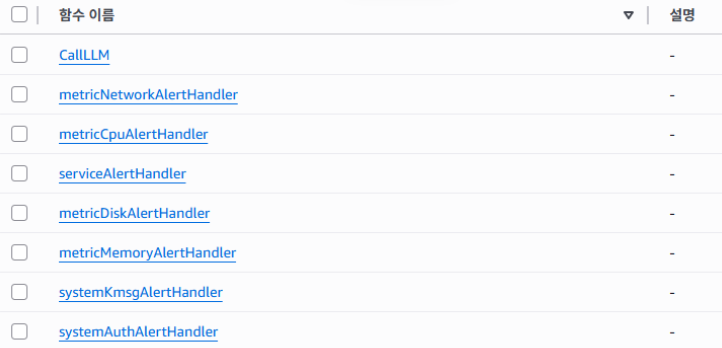
- CPU 기준 람다 함수 (10/2)
import json
import os
import re
import boto3
from datetime import datetime

SNS_TOPIC_ARN = os.environ["SNS_TOPIC_ARN"]
AWS_REGION = os.environ.get("AWS_REGION", "ap-northeast-2")
sns = boto3.client("sns", region_name=AWS_REGION)

def extract_numeric_value(value_string: str) -> str:
    """Grafana의 valueString에서 숫자만 추출 (예: 10, 85.4 등)"""
    if not value_string:
        return "데이터 없음"
    # "value=10" 또는 "value=85.4321" 같은 패턴에서 숫자만 추출
    match = re.search(r"value\s*=\s*([0-9]+(?:\.[0-9]+)?)", value_string)
    if match:
        return match.group(1)
    # 혹시 숫자 형태가 다르면 fallback으로 전체에서 숫자 추출
    match = re.search(r"([0-9]+(?:\.[0-9]+)?)", value_string)
    return match.group(1) if match else "데이터 없음"

def clean_summary(summary: str) -> str:
    if not summary:
        return "요약 정보 없음"
    return summary.replace("%!f(<nil>)", "데이터 없음").replace("[no value]", "데이터 없음")

def lambda_handler(event, context):
    print("[CPU] Event received:", json.dumps(event)[:1500])

    # 1️⃣ Body 파싱
    body = event.get("body", event)
    if isinstance(body, str):
        body = json.loads(body)
    payload = body

    alerts = payload.get("alerts", [])
    now_utc = datetime.utcnow().strftime("%Y-%m-%d %H:%M:%S UTC")

    details = []

    for a in alerts:
        labels = a.get("labels", {})
        annotations = a.get("annotations", {})

        # 인스턴스명
        instance = (
            a.get("instance")
            or labels.get("instance")
            or labels.get("pod")
            or labels.get("node")
            or "데이터 없음"
        )

        # ✅ valueString에서 숫자만 추출
        raw_value = a.get("valueString") or a.get("current_value") or ""
        cpu_value = extract_numeric_value(raw_value)

        # 요약 메시지 정리
        summary = clean_summary(
            annotations.get("summary") or annotations.get("description") or "요약 정보 없음"
        )

        start_time = (
            a.get("startsAt", "").replace("T", " ").replace("Z", " UTC")
            if a.get("startsAt")
            else "시간 정보 없음"
        )

        details.append(
            f"🔧 인스턴스: {instance}\n"
            f"📈 현재 CPU 사용률: {cpu_value} %\n"
            f"📝 요약: {summary}\n"
            f"⏰ 발생 시각: {start_time}\n"
        )

    subject = "🚨 [Grafana] CPU 사용률이 90%를 초과했습니다 !!!"
    message = f"""
⚙️ CPU 사용률 이상 감지
━━━━━━━━━━━━━━━━━━━━━━━
📅 감지 시각: {now_utc}
📊 알림 개수: {len(alerts)}건

📌 상세 정보:
{'-'*40}
{chr(10).join(details)}

🛠️ 조치 가이드:
- CPU 사용률이 90% 이상인 인스턴스의 프로세스 상태를 점검하세요.
- 불필요한 백그라운드 작업을 중단하거나, 리소스 할당량을 조정하세요.
- 필요 시 워크로드를 다른 노드로 분산하거나 스케일 아웃을 고려하세요.
"""

    sns.publish(TopicArn=SNS_TOPIC_ARN, Message=message, Subject=subject[:100])
    return {"statusCode": 200, "body": json.dumps({"ok": True})}
API Gateway 엔드포인트 생성 및 Lambda 연동
마지막으로 외부(ElastAlert)에서 HTTP 요청을 보낼 수 있는 엔드포인트를 생성하고, 이를 Lambda 함수와 연결한다.
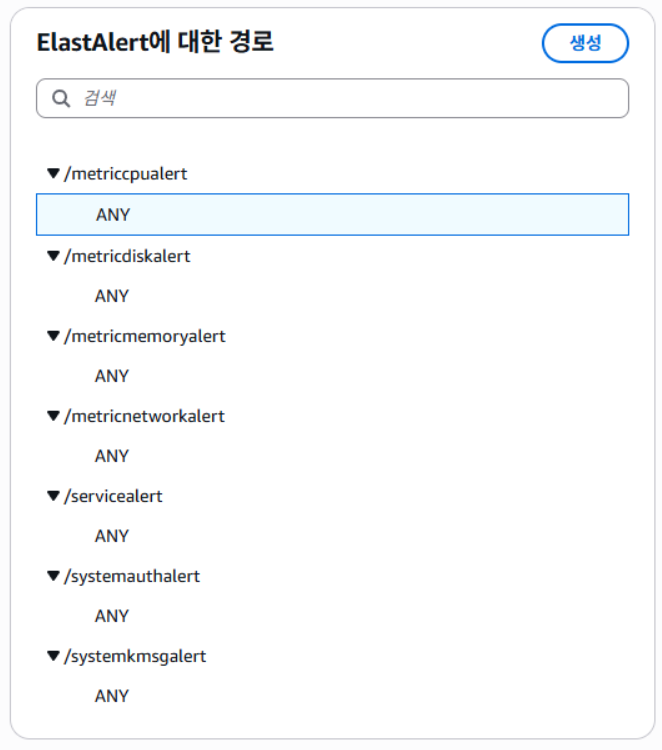
- 각각 과정에 대한 설명은 Elastalert2를 위한 AWS API Gateway, Lambda, SNS 설정 게시글에 있다.
728x90
반응형
'현대 오토에버 클라우드 스쿨' 카테고리의 다른 글
| 팀 프로젝트) AWS MSK 구축하기 (feat. Terraform) (0) | 2025.11.11 |
|---|---|
| 팀 프로젝트) Terraform EKS - 3개 클러스터 통합 관리 (VPC 공유) (0) | 2025.11.11 |
| 팀 프로젝트) Elastalert2를 위한 AWS API Gateway, Lambda, SNS 설정 (0) | 2025.11.11 |
| 팀 프로젝트) AWS Lambda 함수 (1) | 2025.11.11 |
| 팀 프로젝트) Kafka (0) | 2025.11.11 |